
WiFi Video Doorbell: 7 Tips for Choosing One for a Single-Family Home
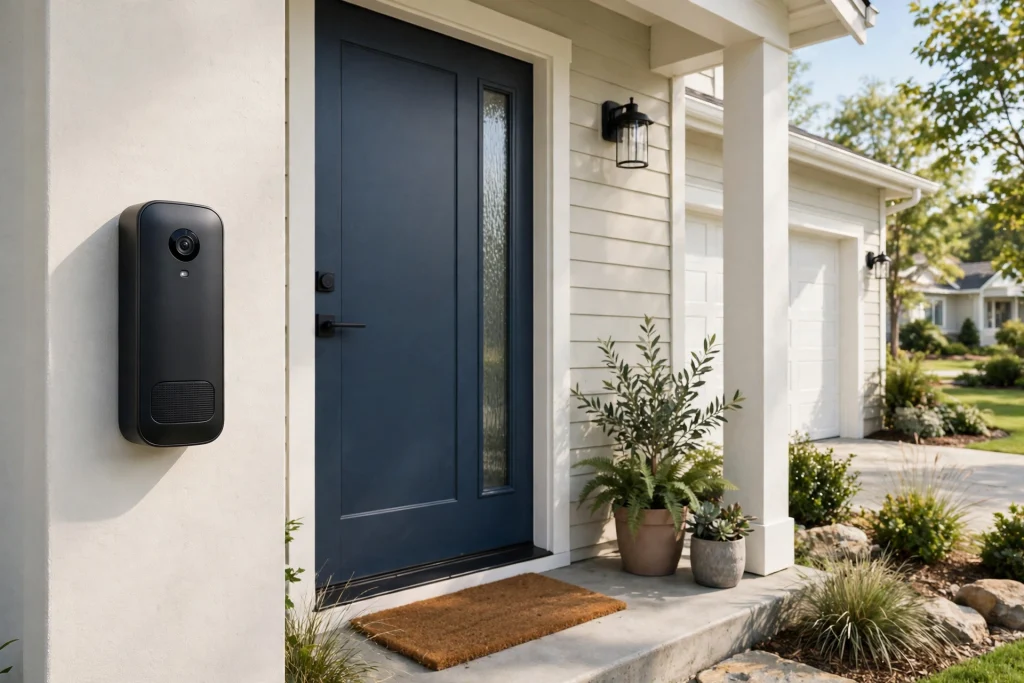
For a single-family home, the front door is the one entrance everyone uses — family, friends, and couriers. A WiFi video doorbell puts a camera, a speaker, and a doorbell button in one small device beside that door, so you can see and speak to whoever is there from your phone, whether you are in the kitchen or across town.
It sounds simple, and the best systems are — but not every video doorbell is built the same way. Video quality, power options, motion alerts, and network reliability all vary, and a wrong choice can mean missed visitors, a dead battery on a cold morning, or a camera that cannot see a face clearly at night. This guide walks through seven practical tips for choosing one for a single-family home, so the device you buy is the one that actually answers the door the way you expect it to.
What is a WiFi video doorbell?
A WiFi video doorbell is a doorbell with a built-in camera, microphone, and speaker that connects to your home’s WiFi network. When a visitor presses the button — or the motion sensor detects someone approaching — the device sends a live video feed and a notification to your phone, and you can talk to the visitor through the app. Many models also record short clips, so you can check later who came by while you were out.
The idea behind the modern video doorbell is straightforward: the front door is the most-visited spot in any home, and a camera there covers the two moments that matter most — someone ringing to be let in, and someone approaching who never rings at all. It covers both without the cost or the wiring of a full camera system, because it uses the network your home already has.
That wireless connection defines the category. Unlike a wired intercom that needs a cable run from the door to an indoor screen, the doorbell talks to your router over the air, and the “screen” is the phone already in your pocket. Mounting the unit, connecting it to WiFi, and pairing the app is a job most homeowners finish in under an hour.
Why a WiFi video doorbell fits a single-family home
A detached house has exactly one front door and one driveway, and a WiFi video doorbell is a natural fit for that layout for three reasons.
First, it covers the two daily problems a house has: deliveries and unexpected visitors. A camera at the door lets you confirm a drop-off, direct the courier, or catch a missed delivery before it becomes a lost one. For visitors, seeing who is there before you open the door is simply safer — especially for children or older family members home alone during the day.
Second, it works with the house you already have. There is no need to run new cabling through finished walls or add an indoor monitor in the hallway. It uses the router, the phone, and the power already in place, which keeps the cost close to the price of the device itself.
Third, it scales with the rest of your home. Many homeowners start with the doorbell and later add a second camera, a smart lock, or an indoor chime — and a model that belongs to a wider intercom family can grow into that setup instead of being replaced by it. GBF’s WiFi doorbell models, for example, pair with the company’s indoor monitors and door stations, so a single-family setup can add an indoor screen later without changing the unit at the door.
7 tips for choosing a WiFi video doorbell
1. Check the WiFi Signal at Your Front Door
A WiFi video doorbell is only as reliable as the signal where it is mounted, and the front door is often the farthest point from the router. Before you buy, stand at your front door with your phone and check the signal: one bar, or a connection that drops when you step outside, means the doorbell will struggle in exactly the same spot.
The fix is usually simple — move the router closer to the front of the house or add a mesh node nearby. Do the check before you order, not after the unit is on the wall.
2. Choose the Power Option That Suits Your Door
A WiFi video doorbell comes in two power styles: battery-powered and wired. Battery models run for weeks or months on a charge and need no existing wiring at all, which makes them the easiest option where there is no existing wiring. The trade-off is maintenance: you will need to recharge the battery, and cold weather shortens the time between charges.
Wired models draw power from your existing doorbell transformer, so they never need charging — but that transformer must supply enough power. If your house already has a wired doorbell, a wired model is usually the set-and-forget choice. If it does not, weigh the convenience of a battery model against recharging it a few times a year.
3. Look Past the Resolution Number
Camera specifications are easy to compare and easy to misread. A WiFi video doorbell advertised at 1080p sounds sharp, but the image you actually get depends on the lens, the sensor, and how the camera handles the hard light at a front door — bright sun behind a visitor, or a dark porch at night.
When you compare models, check three details rather than the headline number: the field of view, which decides whether you can see a parcel on the ground as well as a face; night vision, which decides whether the camera is useful after dark; and backlight handling, which decides whether a visitor in sunlight is a face or a silhouette.
4. Decide How You Want to Answer: Phone, Screen, or Both
Every WiFi video doorbell answers on a phone app, but that is not the only option — and for a family home, it may not be the best one. Children, grandparents, and guests do not always have the app installed, and a phone charging in another room is no help when the doorbell rings.
Look for a doorbell that can also ring an indoor chime or an indoor monitor. A chime in the hallway means everyone in the house hears the door, and a monitor adds video and a talk button inside. GBF pairs its WiFi doorbell models with the MR920 and MR930 indoor monitors and the CM-01 indoor chime, so the same door unit can answer on a hall screen as well as on your phone.
5. Check Motion Detection and Alerts Before You Buy
A WiFi video doorbell that only reacts to a button press is only half a doorbell. The other half is motion detection: the camera notices someone approaching, sends an alert, and starts recording before the visitor ever rings.
The quality of that detection matters more than the fact that it exists. Basic sensors trigger on passing cars and swaying branches, and a phone that buzzes ten times an hour soon gets its notifications switched off. Look for adjustable detection zones, so you can limit alerts to your walkway and porch, and for person detection or AI filtering, which ignores everything that is not a person. Fewer false alerts means the alerts you do get are worth answering.
6. Understand Storage: Cloud, Local, or Both
When a WiFi video doorbell records a clip, that clip has to live somewhere, and the options decide both the cost and the privacy of the system. Cloud storage keeps clips on the manufacturer’s servers for a subscription fee and lets you review footage from anywhere. Local storage keeps clips on a memory card or a hub in your home, with no ongoing fee — but the footage stays at the house.
If you want to check who came by while you were on holiday, cloud storage — or a hybrid setup with a local copy plus a cloud backup — is the practical answer. If you would rather not pay a subscription or send video to a server, a local-storage model with a large card is the better fit. Check the terms before you buy: some doorbells record only with a paid plan, and that cost belongs in the budget from day one.
7. Plan the Mounting and the Angle Before Install Day
A WiFi video doorbell is a small device, and a few centimetres of placement change what it sees. Mount it around chest height — roughly 1.2 metres from the ground — and the unit should face the walkway, not the wall beside the door. Too high and it sees the top of a visitor’s head; too low and it misses faces; angled at the frame and it films the wall instead of the path.
Before you drill, hold the unit in place and check the view in the app: can you see a face at the door and a parcel on the step? A wedge mount, included with many kits, can angle the camera toward the path when the door sits at an angle to the walkway. Ten minutes of checking before mounting saves a second round of drilling later.
Installation Checklist: Before You Mount the Doorbell
A short checklist prevents the most common delays when installing one:
- WiFi signal: Confirm a strong, stable signal at the front door on your phone, and add a mesh node or extender if it is weak.
- Power: Decide battery or wired, and confirm the transformer rating if you are going wired.
- Mounting spot: Pick the height and angle, and check the camera view in the app before drilling.
- Detection zone: Set the motion zone to cover the walkway and porch, not the street.
- Household setup: Install the app on one phone per household member who should answer the door, and test a call.
Hand this list to your installer a few days before the job, or run through it yourself the evening before — most delays come from the signal, the power, and the angle that were not checked first.
Frequently Asked Questions
Does a WiFi video doorbell need existing doorbell wiring?
No. Battery-powered models need no wiring at all — they mount on the wall and connect over WiFi. Wired models use your existing doorbell transformer, so they suit houses that already have one — but wiring is an option, not a requirement.
Can I answer a WiFi video doorbell when I am not at home?
Yes — that is the main advantage of the design. The doorbell sends the call to your phone over the internet, so you can see and speak to a visitor from work, from the car, or from another country, as long as your phone has a connection.
Will a WiFi video doorbell work in winter?
Yes, but cold weather shortens battery life noticeably. If your winters are cold, a wired model avoids the recharge chore — or plan to bring the battery inside to charge more often in the coldest months.
Can a WiFi video doorbell record video, or only show a live feed?
Most models do both: a live feed when someone rings or motion is detected, and short clips saved to the cloud, a memory card, or both. Check whether recording needs a subscription before you buy, so the ongoing cost is no surprise.
Is a WiFi video doorbell enough security for a single-family home?
It is a strong first layer: it covers the front door, deters opportunistic visitors, and records who came by. For a full setup, pair it with a second camera at the back door or garage and a smart lock.
Conclusion
Choosing a WiFi video doorbell for a single-family home comes down to a handful of practical checks: confirm the WiFi signal at the door, pick the power option that suits your house, look past the resolution number to the lens and night vision, decide how everyone in the house will answer, tune the motion detection, understand the storage and subscription terms, and check the mounting angle before you drill. Get those right and the front door becomes the easiest part of the house to manage — one small device, one app, and a clear view of whoever is there.
Browse the single-family residence doorbell kits to compare WiFi doorbell models for your home, or explore the wider range of GBF WiFi/IP door stations — and if you are weighing a larger building instead, GBF SentryLink covers properties from 8 to 1,000 units. For help matching a model to your door and wiring, talk to the GBF team.